



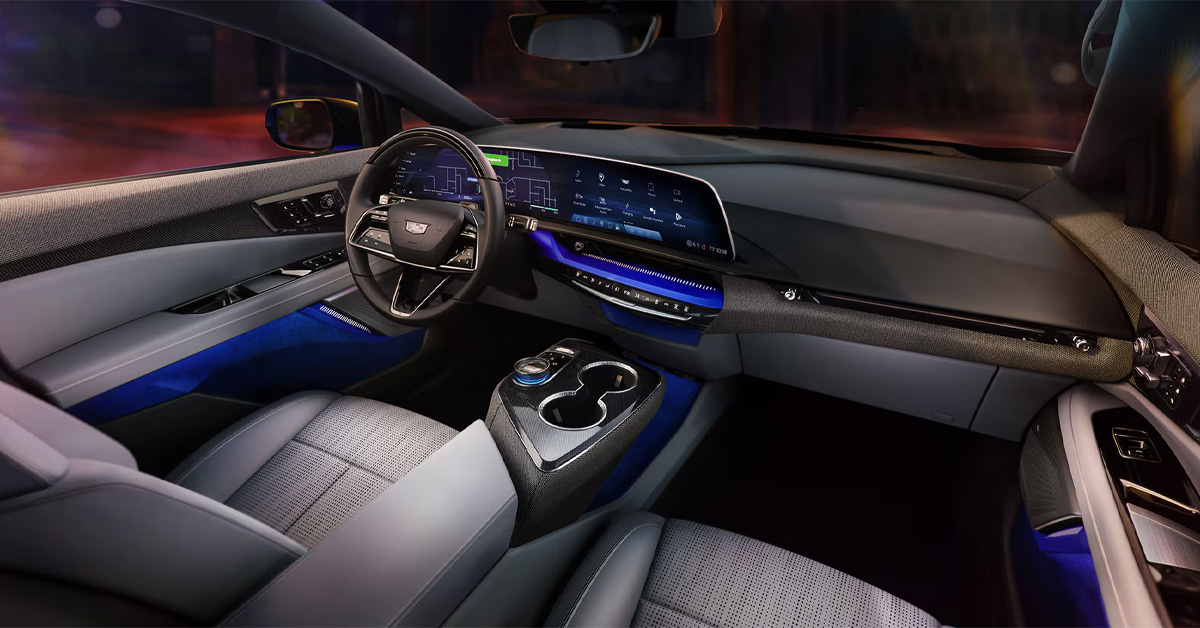
In 2026, you can remotely start your Cadillac’s heating and AC via either the myCadillac app or the key fob remote start function, allowing the vehicle to pre-condition the cabin before you enter. Once activated, the system automatically adjusts temperature, airflow, and available comfort settings based on your last preferences so the interior is ready when you are. This feature works across supported models like the LYRIQ, OPTIQ, and Escalade to deliver consistent comfort in any season.
Crestview Cadillac is here to help you with every part of your ownership journey, including vehicle sales, certified service, genuine parts, and flexible financing options. Whether you are exploring a new Cadillac or need help maintaining your current one, our team is ready to guide you with straightforward support. Contact us today or visit Crestview Cadillac to get started with expert assistance and a seamless experience from financing to service and beyond.
What Steps Are Required to Turn on Cadillac Heating and AC Remotely Using the myCadillac App?
The myCadillac app gives you full access to Cadillac remote climate control 2026 features, allowing you to start heating or cooling your vehicle before you even step outside. This helps ensure the cabin is comfortable right when you get in, whether you are heading out early in the morning or finishing a long day. In newer models like the OPTIQ, the system responds quickly and smoothly, making remote setup feel effortless.
Simple steps to start climate control
Once your vehicle is connected to the app, the process only takes a few taps:
- Open the myCadillac app and select your vehicle
- Tap into the “Controls” menu
- Choose the climate option
- Select heating or AC
- Press start to activate
The system will automatically adjust based on your last saved settings.
What happens after activation
After you start the system, your Cadillac begins preparing the cabin by:
- Adjusting the temperature based on your last preference
- Activating airflow and fan settings automatically
- Preparing the interior before you enter
This means you can step into a vehicle that already feels ready, no matter the weather conditions outside in areas like Valinda or Irwindale.
Why does it make daily driving easier?
Instead of waiting for the cabin to warm up or cool down, everything is handled in advance through your phone. It adds convenience, especially on busy days when timing matters.
If you need help setting up your app or learning how to use remote climate features in your OPTIQ, Crestview Cadillac can assist with setup and guidance so everything works exactly as intended.
How Do You Remotely Start Cadillac AC and Heat Using the Key Fob or Remote Start Feature?
The key fob remote start system gives you a fast way to remotely start the Cadillac AC and heat without using your phone. It activates your vehicle’s climate system based on your last saved settings, so the cabin begins adjusting before you even open the door. In larger models like the Escalade, this feature is especially helpful since it helps bring the interior to a comfortable temperature more quickly.
How to activate remote start with the key fob
Using the key fob only takes a few seconds:
- Press the lock button twice
- Press and hold the remote start button
- Wait for confirmation from the lights or the horn
Once activated, the vehicle starts preparing the cabin automatically.
What the system does after starting
After the remote start is engaged, your Cadillac will:
- Adjust heating or cooling based on prior settings
- Activate defrost or ventilation when needed
- Begin conditioning the cabin before entry
- Run for a limited time before shutting off
This ensures the vehicle is ready when you are, without extra steps.
Why is it useful in everyday situations
On a cold morning in Irwindale or a warm afternoon in Valinda, starting your Escalade ahead of time means stepping into a cabin that already feels close to ideal. It removes the wait time and makes every drive feel more comfortable from the moment you enter.
If you need help getting familiar with remote start or want to explore Escalade models with advanced climate features, Crestview Cadillac can assist with setup and guidance so everything works smoothly from the start.
What Climate Customization Options Are Available Through Cadillac Remote Controls?
Cadillac remote climate features allow more than just turning the system on. Through Cadillac remote start climate settings, you can adjust key comfort preferences before entering the vehicle so the cabin is already aligned with how you like it. In models like the LYRIQ, these adjustments respond quickly and smoothly, making pre-conditioning feel seamless.
Key settings you can control remotely
Once connected through the app or remote start system, you can manage several comfort options:
- Cabin temperature adjustment based on your preference
- Fan speed control for stronger or softer airflow
- Airflow direction to target specific areas
- Sync settings to unify cabin zones
- Last-used climate preferences that restore automatically
These settings work together to prepare the interior, not just activate it.
How it feels in everyday use
On a cool morning in Walnut, you can set a warmer, gentle airflow before leaving home. On a hot afternoon in Valinda, a stronger cooling setting can be activated in advance so the cabin feels comfortable right away. Instead of waiting for the system to adjust after starting the vehicle, everything is already in place.
Why these options matter
These remote adjustments help you:
- Enter a cabin that already feels comfortable
- Reduce manual changes after starting the vehicle
- Maintain consistent comfort across weather changes
- Improve overall driving readiness
If you want help getting these features set up or want to see how they work in a LYRIQ, Crestview Cadillac can walk you through the process and make sure your system is fully optimized for daily use.
How Do LYRIQ, OPTIQ, and Escalade Models Enhance Remote Climate Comfort?
Cadillac’s newer models refine remote climate control by making pre-conditioning faster, smarter, and more consistent. The Cadillac heating and AC remote access guide for these vehicles highlights improved response times and better integration with driver preferences, so the cabin feels ready before you even open the door.
How each model improves comfort
Each vehicle handles remote climate control in a slightly different way based on its design and technology:
LYRIQ
- The electric platform enables quick, quiet preconditioning
- Efficient temperature control without engine delay
- Smooth cabin-wide comfort before entry
OPTIQ
- Fast, responsive climate activation through connected systems
- Easy syncing with saved preferences
- Well-balanced comfort for daily driving needs
Escalade
- Strong multi-zone climate performance for a larger cabin
- Consistent heating and cooling across all rows
- Enhanced comfort for passengers in every seat
Why these differences matter
While the goal is the same, each model delivers a tailored experience based on size and system design. Smaller cabins respond quickly and efficiently, while larger SUVs focus on maintaining comfort across multiple seating areas.
A more comfortable start every time
From solo commutes to family trips around Irwindale or Walnut, these systems help ensure the cabin is already comfortable before you step in. It reduces wait time and makes every drive feel more controlled from the start.
If you want help understanding which model fits your needs or need assistance setting up remote climate features, Crestview Cadillac can guide you through the process and make sure everything is ready for everyday use.
What Limitations or Requirements Should You Know About Cadillac Remote Climate Features?
Cadillac’s 2026 remote climate control 2026 features are highly convenient, but they do require a few conditions to work properly. In models like the OPTIQ, performance is smooth once set up, but remote heating and cooling depend on connectivity, subscriptions, and system settings.
Key requirements to use remote climate control
Before using remote features, make sure the following are in place:
- Active myCadillac account with your vehicle connected
- Eligible OnStar or connected services plan
- Stable cellular connection for remote commands
- Properly enabled vehicle remote settings
Without these, remote climate commands may not activate.
Built-in system limits to know
Even when everything is active, the system operates within set limits:
- Remote start runs for a limited duration before shutting off
- Climate adjustments follow stored settings, not manual fine-tuning in real time
- Extreme temperatures may take longer to fully balance the cabin
- Additional remote starts may be needed in harsh weather
These safeguards help protect the vehicle while maintaining comfort.
Why this matters in daily use
On a cold morning in Walnut or a warm afternoon in Irwindale, you may notice the cabin improves gradually rather than instantly. This is normal and part of how the system manages efficiency and safety.
If you want help confirming your connected services or setting up remote climate features in your OPTIQ, Crestview Cadillac can assist so everything is properly activated and ready for everyday use.
How Does Cadillac Remote Climate Control Improve Daily Driving in Vincent, Irwindale, Valinda, and Walnut?
How Do I Remotely Turn on the Heating or AC in My Cadillac?
You can remotely turn on the heating or AC in your Cadillac using the myCadillac app by selecting your vehicle, opening Controls, choosing Climate, and starting the system. You can also use the key fob remote start feature, which activates your last saved climate settings automatically.
Can I Control My Cadillac’s Climate Settings With the Key Fob or App?
Yes, you can control your Cadillac’s climate settings with both the myCadillac app and the key fob. Both options allow you to start the vehicle remotely and activate heating or cooling based on your previously saved preferences.
Which 2026 Cadillac Models Offer Remote Climate Control?
Most newer Cadillac models with remote start and connected services support remote climate control, including vehicles like the LYRIQ, OPTIQ, and Escalade, depending on configuration and active subscription services.
Why Is My Cadillac Remote Heating or AC Feature Not Working?
Your remote heating or AC feature may not work if your connected services subscription is inactive, the vehicle is outside cellular range, the myCadillac app is not properly connected, or remote start features are turned off in vehicle settings.
Does Remote Climate Control Automatically Adjust Cabin Temperature in a Cadillac?
Yes, Cadillac remote climate control automatically adjusts cabin temperature based on your last saved settings and current conditions. It manages heating, cooling, fan speed, and airflow without requiring manual adjustments each time.
Stay Connected to Cadillac Comfort and Remote Convenience
Remote climate control is only one part of what makes modern Cadillac ownership more convenient. Being able to prepare your cabin before you enter adds everyday comfort that quickly becomes second nature, whether you are heading to work or starting a weekend drive. It is a simple feature that makes a noticeable difference in how each trip begins.
Explore Cadillac technology and luxury in person
Drivers from Vincent, Irwindale, Valinda, and Walnut can explore a full lineup of models like the LYRIQ, OPTIQ, and Escalade, each offering advanced comfort and connected features designed for daily use.
If you are comparing options, it can also help to look at how Cadillac models stack up against others in their class. Insights like Cadillac Escalade Luxury vs. Platinum Luxury and Cadillac LYRIQ Sport vs. BMW iX xDrive60, along with considerations around the downsides of the Tesla Model Y vs. Cadillac Escalade IQ, offer a closer look at performance, comfort, and technology differences that matter in real driving situations.
Experience it for yourself at Crestview Cadillac
If you want help learning more about remote climate features or exploring available Cadillac models, Crestview Cadillac is ready to assist. Our team can guide you through features, comparisons, and inventory so you can choose the right fit with confidence.
Visit or contact Crestview Cadillac today to get started and experience how Cadillac comfort and technology work together on every drive.
Get Directions to Crestview Cadillac
Disclaimer: All information is provided for general informational and entertainment purposes only. While we strive for accuracy, we cannot guarantee that all content is complete, current, or error-free. Any reliance you place on such information is strictly at your own risk. This article may include opinions and is not endorsed by, or officially affiliated with, any vehicle manufacturer or brand. Always consult official sources – such as the vehicle’s owner’s manual, authorized dealerships, or certified professionals – for the most up-to-date and personalized information.
Connect with us


- July 2026
- May 2026
- April 2026
- March 2026
- February 2026
- January 2026
- December 2025
- November 2025
- October 2025
- September 2025
- August 2025
- July 2025
- June 2025
- May 2025
- April 2025
- March 2025
- February 2025
- November 2024
- October 2024
- September 2024
- August 2024
- July 2024
- June 2024
- May 2024
- April 2024
- March 2024
- February 2024
- January 2024
- December 2023
- November 2023
- October 2023
Archives
Categories